Your script, perfectly in sync — hands-free.
AutoTeleprompter listens as you speak and scrolls exactly at your pace. No remote fumbling, no racing to keep up — just look at the camera and talk.
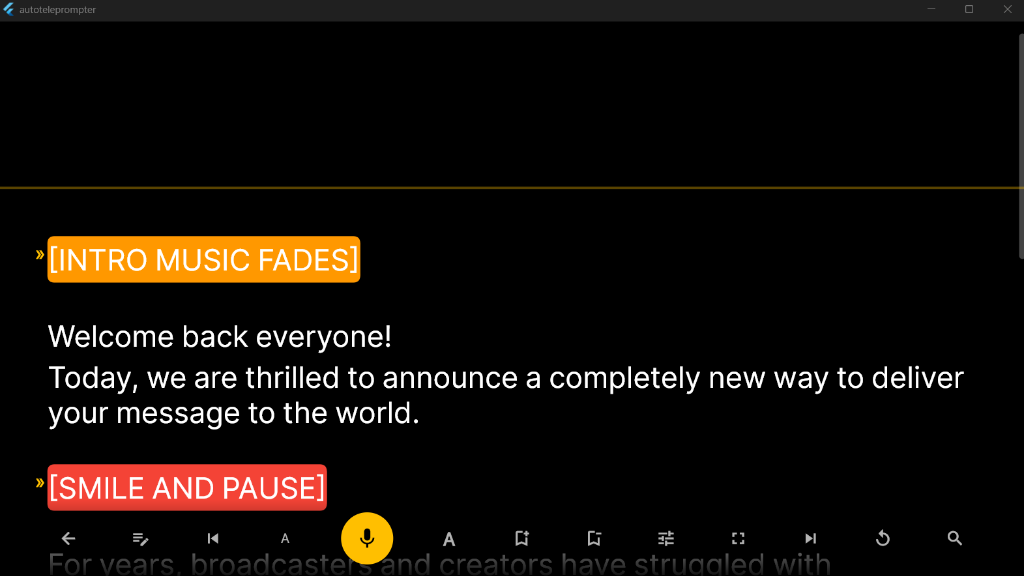
Built for broadcasters, creators, presenters, and houses of worship who need their words on cue — every time.
Key Features
Voice-controlled scrolling
Speech recognition follows your voice and moves the script for you. Pause, ad-lib, slow down — the prompter keeps up. Multiple recognition profiles let you fine-tune sensitivity for your reading style. Audio is processed by your device's speech service; we never store recordings.
A real script editor
Colors, highlights, bold/italic/underline, custom fonts, alignment, and full right-to-left (Hebrew/Arabic) support. Mark your cues, invert colors for any lighting, and import scripts from RTF, DOCX, TXT, Markdown, or PDF.
Bookmarks & instant navigation
Add multiple bookmarks, jump between sections live, and never lose your place mid-broadcast. Bookmarks work in both the editor and presenter.
Camera-rig ready
Mirror/flip output for beam-splitter teleprompter glass and pro camera setups. Rotate 0°, 90°, 180°, or 270° for any rig orientation. True fullscreen mode hides the title bar and taskbar for a clean broadcast surface.
Encrypted local storage
Your scripts are encrypted at rest on your machine. Sensitive content — sermons, legal briefs, confidential speeches — stays protected even if someone accesses your files.
Wi-Fi remote control Pro
Control the prompter from any phone or browser on your local network. PIN-secured pairing, multiple named remote profiles, and real-time commands — start, stop, adjust speed, jump to bookmarks, and invert colors.
Cloud & backup storage Pro
Back up your scripts to Google Drive, Dropbox, or a local folder. Connect your cloud account and sync scripts between your app and your cloud storage.
Content Creator tools Pro
Record MP4 video with sound or WAV audio-only directly alongside your script. Preview your camera first, choose between bubble-feed or full-feed overlay, and start recording with a countdown — all without leaving the teleprompter.
30-day script recovery Pro
Accidentally deleted a script? Pro keeps a 30-day history of your deleted files in a secure local trash folder, letting you restore them instantly with all bookmarks and edits intact.
How It Works
Paste or import your script.
Bring your words in from RTF, DOCX, TXT, Markdown, PDF — or just copy and paste directly into the editor.
Hit Present and start talking.
Position your camera, start the prompter, and deliver your lines naturally. Choose your microphone, adjust the reading line, and go fullscreen.
AutoTeleprompter scrolls in sync.
It listens to your voice and moves exactly at your pace. That's it.